
It has come to my attention that many agencies dipping their toes into block themes or hybrid themes are plugging font sizes and color palettes into theme.json under settings.typograpy.fontSize and settings.color.palette and leaving it at that. While this is “fine” and “correct”, I think folks are missing out on the real power of theme.json at the agency/enterprise level.
We’ve all heard of “design tokens” at this point, right? Technically, theme.json is one big design token system that is built-in to WordPress and the block editor. This is great for simple themes made by one person who is both designer and developer, but it doesn’t scale up well to agency and enterprise work. This is because it’s a developer-driven design system that is specific to WordPress, and without designer buy-in, development will always be reactive to design updates.
Agency WordPress work often goes something like this:
- Final static designs are approved without developer input
- Designs are handed to the development team to build
- Development team “reverse-engineers” the design system from the static designs, plugging values into
theme.jsonand handling the rest with custom CSS and often custom blocks
This works ok most of the time, but there’s always more after that:
- New modules/pages are designed and approved without developer input
- Designs are handed to the development team to incorporate into the existing production site
- Development team once again “reverse-engineers” new aspects of the design system, plugging additional values into
theme.json(and sometimes changing others, resulting in unintended changes across the site), adding even more custom CSS and additional custom blocks
🔧
More often than not, design updates feel like throwing a wrench in “our” system.
Reverse-engineering systems from static designs probably feels very familiar to you. At times it feels like the majority of our job as an agency dev. We could (and often do) do it in our sleep. You might even feel like you’re really good at it, and you might even often intuit systems that aren’t explicit that make later changes/updates easy as pie. But let’s be honest: more often than not, design updates feel like throwing a wrench in “our” system.
What if I told you “It doesn’t have to be this way”?
Here’s the catch: to make this process work a little bit smoother, we devs need to give up just a little bit of control over the primitive values we use as variables in our code.
I am not saying that we should just accept that we often have no input in the design process—the other part of this is that the designer needs to agree to some very basic limitations, namely using a set of design tokens (variables in our parlance) in their design. Tools like Figma help with this, but it’s still possible (though more work for the designer) to do it manually.
Ideally, the designer sets tokens for:
- Colors
- Font sizes
- Font weights
- Spacing
- Border radii
- Any other primitive values for things like shadow blur radius, etc.
Good designers will already be doing this as part of their process, and they may take it even further by creating alias tokens that are named for their purpose. This should feel familiar if you are old enough to have been working with Bootstrap or other CSS frameworks of the 2010s. The difference is that these tokens are designer-driven, based on what their design actually needs instead of a predetermined set of variables.
That is where settings.custom starts to earn its keep.
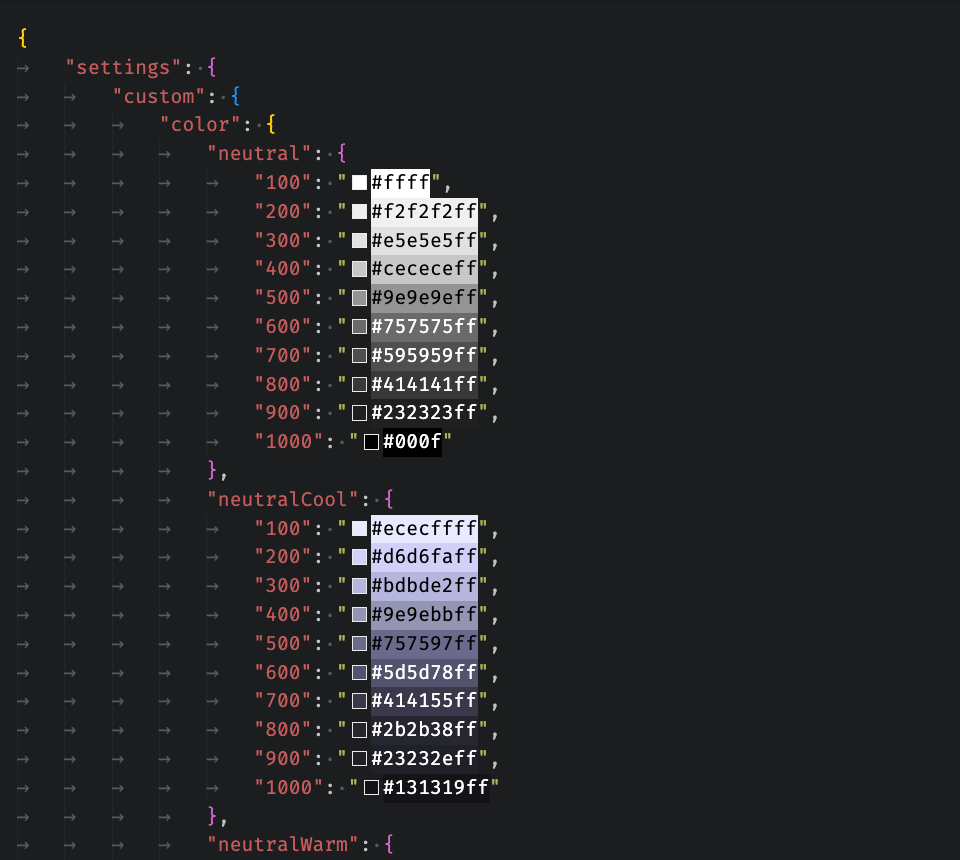
Most teams treat theme.json as the place where editor-facing options live. That is true, but it is only half the story. The more interesting use is treating settings.custom as your theme’s private token registry: a place to store primitive values and semantic aliases that can then be referenced from the parts of theme.json WordPress actually exposes and from the CSS custom properties WordPress prints for you.
In other words, instead of doing this:
{
	"settings": {
		"color": {
			"palette": [
				{ "slug": "brand", "name": "Brand", "color": "#ffc655" },
				{ "slug": "text", "name": "Text", "color": "#131319" }
			]
		},
		"typography": {
			"fontSizes": [
				{ "slug": "sm", "name": "Small", "size": "0.875rem" },
				{ "slug": "md", "name": "Medium", "size": "1rem" }
			]
		}
	}
}…you can define the real source of truth once and reference it everywhere else:
{
	"settings": {
		"custom": {
			"color": {
				"gold": {
					"400": "#ffc655",
				},
				"neutral": {
					"1000": "#131319"
				}
			},
			"palette": {
				"brand": "var(--wp--custom--color--gold--400)",
				"text": "var(--wp--custom--color--neutral--1000)"
			},
			"fontSize": {
				"275": "0.875rem",
				"300": "1rem"
			}
		},
		"color": {
			"palette": [
				{
					"slug": "brand",
					"name": "Brand",
					"color": "var(--wp--custom--palette--brand)"
				},
				{
					"slug": "text-primary",
					"name": "Text Primary",
					"color": "var(--wp--custom--palette--text)"
				}
			]
		},
		"typography": {
			"fontSizes": [
				{
					"slug": "sm",
					"name": "Small (14pt)",
					"size": "var(--wp--custom--font-size--275)"
				},
				{
					"slug": "md",
					"name": "Medium (16pt)",
					"size": "var(--wp--custom--font-size--300)"
				}
			]
		}
	}
}That may not look radically different at first glance, but it changes the direction of the system. Now your editor color palette is not the source of truth. Your font size presets are not the source of truth. They are just curated editor-facing views into a larger token system.
That gives you a few advantages immediately:
- Primitive values live in one place.
- The same token can feed multiple public presets.
- You can keep internal-only values in the system without exposing them in the editor UI.
- Designers and developers have a better chance of talking about the same thing.
That third point matters more than it first appears. Not every value in a design system belongs in the editor. Sometimes you need colors that don’t belong in page content, motion durations, overlap offsets, stroke widths, shadow values, or layout measurements that are implementation details rather than authoring controls. The settings.custom object is perfect for that because WordPress still outputs those values as CSS variables.
For example:
{
	"settings": {
		"custom": {
			"layoutSize": {
				"gutter": "clamp(1rem, 4vw, 3rem)"
			},
			"radius": {
				"sm": "0.25rem",
				"lg": "1rem"
			},
			"duration": {
				"fast": "150ms"
			}
		}
	}
}You can then use them later in CSS without inventing a second token system outside of theme.json:
.card-grid {
	gap: var(--wp--custom--layout-size--gutter);
}

.card {
	border-radius: var(--wp--custom--radius--lg);
	transition-duration: var(--wp--custom--duration--fast);
}That is the part I think people miss: settings.custom is not just “miscellaneous values.” It is the connective tissue between design tokens, editor presets, and front-end implementation.
It also creates a cleaner workflow with design tools. If your designer is already maintaining tokens in Figma or exporting them as JSON, there is often a pretty direct path into settings.custom. Usually the biggest cleanup step is naming—a token like font-size-body-sm or color-neutral-900 may need to become a nested camelCase object so that WordPress can generate predictable custom property names (like --wp--custom--layout-size--gutter above).
That is a pretty nice trade. A little translation up front (that can likely be automated) buys you a token system that is native to WordPress, available to PHP-rendered blocks, available to editor presets, and available to your CSS.
If you’re working with a really good designer who has set up semantic token aliases, you might be able to take that entire layer and apply them as the editor-facing settings.color.palette and such. And, maybe one day, we’ll have the ability to separate palette colors into sections to help editors choose the right colors based on the design system: these are text colors, these are surface colors, etc.
Once you start thinking this way, theme.json stops being a config file you fill out at the end and starts behaving more like a translation layer between design language and implementation.
And if you want to take that one step further, you can build higher-level conventions on top of those custom tokens. Almost every design handoff includes a typography page, but the raw token values that we have in theme.json are meant for systems, not editors—font family, size, weight, line height, and tracking are useful primitives, but they are a lousy authoring interface. And unfortunately I’ve seen too many agency devs (including myself) set all of those other properties based on the font size chosen in the editor (keyed on the .has-*-font-size class name that is added), which will inevitably cause more headaches than it solves. On one project, I used settings.custom values as the foundation for a typography preset system that translated those low-level tokens into editor-friendly presets with previews that they could easily apply. I will save the implementation for another post, but it turned out to be a very effective bridge between a designer’s type scale and an editor’s actual workflow.
The idea here is simple:
Do not make your editor presets your source of truth. Make them consumers of an underlying token system.
That shift will not solve every agency handoff problem. But it does make theme updates less brittle, design changes less surprising, and the gap between “what was designed” and “what got built” a little narrower.