
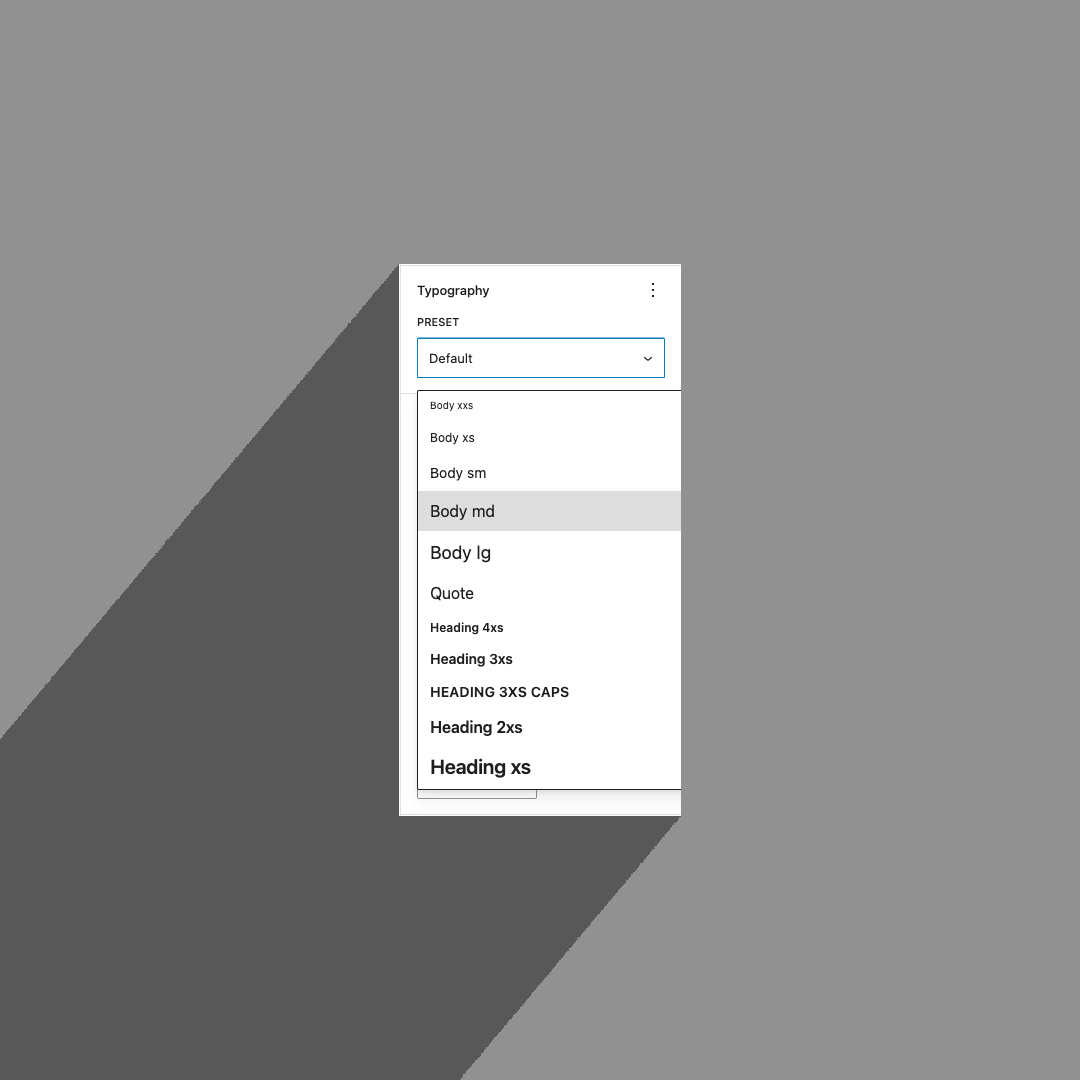
A working example repo is available here.
By the time you may be reading this, I hope that this feature has landed in WordPress core. But at the time of writing, and for many years now, the idea of typography presets in Gutenberg—that is, easily-applied collections of styles such as font family, style, weight, line height, etc.—have only been dreamed of by your average agency WordPress developer, including yours truly.
We have many individual typography settings at our disposal which allows for a huge range of text styling, but in the agency world, we are often working under very specific constraints. On one hand, we are provided a static design or “design system”, and on the other, we must make it “easy” for site editors to apply this design system when editing and creating content. You can be sure, then, that the design system does not list each font size, style, and weight as separate variables to be applied as you wish. Rather, a strict typography hierarchy is provided, with headings and all manner of other miscellaneous text styles defined as set packages of style properties that together form the typographic gestalt.
The idea of typography presets is not limited to website design. We’ve been using them in Microsoft Word and Adobe InDesign and, hell, even Google Docs for years and years. It’s a standard way of approaching typographic design. And yet, as of WordPress 6.7, this feature eludes us. Perhaps there are other GitHub issues lost to the void related to this, but somehow this one that caught my attention recently from Fabian Kägy was only just opened in November 2024, 2 months ago at the time of writing.
We theme devs have come up with all sorts of hacks and workarounds to this predicament. The one I see most often is to collect all of the class names that are dynamically generated by WordPress for all of your font size settings in theme.json (i.e. has-md-font-size), add those to your theme stylesheet, and include a bunch of other declarations for each, so that selecting a font size also dictates weight and line height, etc. You might instead add styles to heading elements via theme.json, but you’ll run into trouble when the design you’re handed dictates font sizes for headings on a different page that don’t correspond to the strict h1-h6 hierarchy you’ve set; using incorrect heading levels is a big accessibility problem.
So then, what are we to do? Must we take this into our own hands?
Well, I have.
Success Criteria
Before I start throwing code at you, let’s define some success criteria so that we’re all on the same page about how this is going to work.
1. Typography presets are defined in theme.json
These presets should not only utilize existing design tokens in theme.json, they should be edited alongside them and exist as live variables on the front end. Updating them should propagate changes without updates required in any other code. We should also be able to set default presets for headings, body text, and blocks within theme.json.
2. No CSS hacks are required
We won’t be globbing unrelated properties onto existing styles such as font size presets. In fact, no additional stylesheets* will be needed to make this work.
*Other than dynamically generated ones.
3. When selecting presets to apply, the styles should be visible in the selector
The old school hack of adding additional styles to font size classes means that you can’t see what the style looks like until you’ve applied it to some text in the editor. Our control will actually show the preset styles in the select dropdown, just like other “word processors”.
4. It feels like it could be a core feature
Our users don’t want to be presented with a bunch of disparate interfaces. I could just say that “we must settle for adding a new panel, but at least it looks like the other panels”, but no. We’ll add this amongst all the other selectable Typography settings, and even set it as the only default setting instead of font size.
Declaring Presets
First, we will start with theme.json: we will declare our typography presets and then figure out how to parse them and make them work on the front and back end later.
We are somewhat limited in how we can add our custom presets to theme.json. If this were a core feature, you would likely define them in settings.typography.presets, probably as an array of objects very similar to settings.typography.fontSizes. However, even if we wanted to ignore the theme.json schema, there are issues internal to the WP_Style_Engine class that strip out unexpected data. This leaves us with settings.custom, where we can declare whatever we want so long as it’s a structure of nested objects that ultimately resolve to properties with string values. This means we can’t have a nice array of objects, but this does come with some benefits, such as being able to override individual preset values on the front end by changing the CSS variable that WordPress outputs.
We’ll define our presets in settings.custom.typographyPreset. I’m opting for singular property names instead of plural so that the resulting CSS variables make sense, i.e. --wp--custom--typography-preset--heading-xl--font-size. This must be an object, so we’ll use the preset’s “slug” for each nested property name, with the value being an object that specified the preset’s name as well as a styles object:
{
	"settings": {
		"custom": {
			"typographyPreset": {
				"body": {
					"name": "Body",
					"styles": {
						"fontFamily": "var(--wp--preset--font-family--body)",
						"fontSize": "var(--wp--preset--font-size--300)",
						"fontStyle": "normal",
						"fontWeight": 400,
						"letterSpacing": 0,
						"lineHeight": 1.5
					}
				},
				"heading-sm": {
					"name": "Heading Small",
					"styles": {
						"fontFamily": "var(--wp--preset--font-family--heading)",
						"fontSize": "var(--wp--preset--font-size--400)",
						"fontStyle": "normal",
						"fontWeight": 600,
						"letterSpacing": "-0.01em",
						"lineHeight": 1.2
					}
				},
				"heading-md": {
					"name": "Heading Medium",
					"styles": {
						"fontFamily": "var(--wp--preset--font-family--heading)",
						"fontSize": "var(--wp--preset--font-size--500)",
						"fontStyle": "normal",
						"fontWeight": 600,
						"letterSpacing": "-0.01em",
						"lineHeight": 1.1
					}
				},
				...
			}
		}
	}
}You’ll notice in the highlighted lines above that I’ve used kebab-case for the preset object key (heading-sm) instead of the camelCase (headingSm). This is because, if this were an array of objects, I’d be defining a slug property the same way fontSizes does and there would be no property names to deal with here. Essentially, kebab-case works fine here and it will make potentially transitioning to a core feature easier if I can copy/paste the slug values.
Setting element and block defaults is a little trickier than just defining our presets in the first place. We cannot declare them where we would in core, in the styles object, due again to how WP_Style_Engine strips things out. We’ll again have to define our own custom structure, which I’ve decided to put in settings.custom.defaultTypographyPreset. We’ll somewhat mirror how things are defined in settings.styles where each element or block is an object with a preset field but for convenience I’m also allowing a string value representing the preset slug.
{
	"settings": {
		"custom": {
			"defaultTypographyPreset": {
				"elements": {
					"p": "body",
					"h1": "display",
					"h2": "heading",
					"button": "button"
				},
				"blocks": {
					"core/quote": "heading",
					"core/pullquote": {
						"preset": "body",
						"elements": {
							"cite": "eyebrow"
						}
					}
				}
			}
		}
	}
}This is a bit of a doozy, but it accounts for a lot of potential use cases. First, elements such as headings, buttons, captions, and links can have their default presets set, while specific blocks may set separate presets. We must also account for block variation styles (like the button outline style), nested elements (cite within the pullquote block), and element states (:hover within the link element).
Generating Dynamic Stylesheets
Now that we have our presets and defaults defined, we need to generate stylesheets with all the right selectors and property values. Note that I will be taking some shortcuts here for this proof-of-concept (and yet this post will still be very long and full of code). The core idea is straightforward:
- Read
settings.custom.typographyPresetfrom theme.json - Translate the allowed style properties into CSS declarations
- Build selectors for any preset defaults declared for elements and blocks
- Output a small inline stylesheet on both the front end and in the editor
The first interesting part is that we do not need to read the actual values out of the style object and print them directly. Since these presets live in settings.custom, WordPress has already given us CSS custom properties for them. So instead of emitting hard-coded values, we can point each declaration at the generated variable:
add_action( 'enqueue_block_assets', __NAMESPACE__ . '\\enqueue_preset_styles' );

function enqueue_preset_styles(): void {
	$presets  = wp_get_global_settings( [ 'custom', 'typographyPreset' ] );
	$defaults = wp_get_global_settings( [ 'custom', 'defaultTypographyPreset' ] );

	$style_properties = [
		'fontSize'       => 'font-size',
		'fontFamily'     => 'font-family',
		'fontStyle'      => 'font-style',
		'fontWeight'     => 'font-weight',
		'lineHeight'     => 'line-height',
		'letterSpacing'  => 'letter-spacing',
		'textDecoration' => 'text-decoration',
		'textTransform'  => 'text-transform',
	];

	$preset_styles = [];

	foreach ( $presets as $slug => $preset ) {
		$preset_styles[ $slug ] = [
			'selectors' => [],
			'styles'    => '',
		];

		foreach ( $preset['style'] ?? [] as $style_name => $value ) {
			if ( ! isset( $style_properties[ $style_name ] ) ) {
				continue;
			}

			$property = '--wp--custom--typography-preset--' . $slug . '--style--' . _wp_to_kebab_case( $style_name );
			$property = preg_replace( '/(\d)(\w)/', '$1-$2', $property );

			$preset_styles[ $slug ]['styles'] .= sprintf(
				"\t%s: var(%s);\n",
				$style_properties[ $style_name ],
				$property
			);
		}
	}

	collect_preset_selectors( $preset_styles, $defaults );

	$stylesheet = '';

	foreach ( $preset_styles as $slug => $preset ) {
		if ( empty( $preset['styles'] ) ) {
			continue;
		}

		$selector = '.has-' . $slug . '-typography-preset';
		if ( ! empty( $preset['selectors'] ) ) {
			$selector .= ', ' . implode( ', ', $preset['selectors'] );
		}

		$stylesheet .= $selector . " {\n";
		$stylesheet .= $preset['styles'];
		$stylesheet .= "}\n\n";
	}

	wp_register_style( 'theme-typography-presets', false, [], md5( $stylesheet ) );
	wp_add_inline_style( 'theme-typography-presets', $stylesheet );
	wp_enqueue_style( 'theme-typography-presets' );
}The preset definitions in theme.json remain the source of truth, and PHP’s job is mostly to wire selectors to those existing variables.
Next, we need to collect selectors for whatever defaults we declared in defaultTypographyPreset. Here I’m supporting element-level defaults and block-level defaults, with optional nested element support inside blocks:
function collect_preset_selectors( array &$preset_styles, array $settings, ?string $block_name = null ): void {
	if ( ! empty( $settings['elements'] ) ) {
		collect_element_selectors( $preset_styles, $settings['elements'], $block_name );
	}

	if ( null !== $block_name || empty( $settings['blocks'] ) ) {
		return;
	}

	foreach ( $settings['blocks'] as $current_block_name => $block_settings ) {
		if ( is_string( $block_settings ) ) {
			$block_settings = [ 'preset' => $block_settings ];
		}

		if ( ! empty( $block_settings['preset'] ) && isset( $preset_styles[ $block_settings['preset'] ] ) ) {
			$preset_styles[ $block_settings['preset'] ]['selectors'][] = block_name_to_selector( $current_block_name );
		}

		if ( ! empty( $block_settings['elements'] ) ) {
			collect_element_selectors( $preset_styles, $block_settings['elements'], $current_block_name );
		}
	}
}

function collect_element_selectors( array &$preset_styles, array $element_settings, ?string $block_name = null ): void {
	foreach ( $element_settings as $element => $preset ) {
		if ( ! is_string( $preset ) || ! isset( $preset_styles[ $preset ] ) ) {
			continue;
		}

		$parent_selector = $block_name ? block_name_to_selector( $block_name ) : '';

		$element_selector = match ( $element ) {
			'button'  => '.wp-element-button, .wp-block-button__link',
			'caption' => '.wp-element-caption, figcaption',
			'link'    => 'a',
			default   => $element,
		};

		$preset_styles[ $preset ]['selectors'][] = trim(
			$parent_selector . ' :where(' . $element_selector . ')'
		);
	}
}Applying Presets
Now that we have defined styles for our presets, we need to let editors actually choose one and apply it to a block.
On the PHP side, the cleanest hook point is custom block supports. We register a new support feature, add a typographyPreset attribute to blocks that already support typography, and then output a class on dynamic blocks:
WP_Block_Supports::get_instance()->register(
	'typographyPresets',
	[
		'register_attribute' => __NAMESPACE__ . '\\register_attribute',
		'apply'              => __NAMESPACE__ . '\\apply',
	]
);

function register_attribute( $block_type ): void {
	if ( ! ( $block_type instanceof WP_Block_Type ) ) {
		return;
	}

	if ( empty( $block_type->supports['typography'] ) ) {
		return;
	}

	if ( ! $block_type->attributes ) {
		$block_type->attributes = [];
	}

	if ( ! array_key_exists( 'typographyPreset', $block_type->attributes ) ) {
		$block_type->attributes['typographyPreset'] = [
			'type' => 'string',
		];
	}
}

function apply( $block_type, array $block_attributes = [] ): array {
	if ( ! ( $block_type instanceof WP_Block_Type ) ) {
		return [];
	}

	if ( empty( $block_type->supports['typography'] ) ) {
		return [];
	}

	if ( wp_should_skip_block_supports_serialization( $block_type, 'typography' ) ) {
		return [];
	}

	if ( empty( $block_attributes['typographyPreset'] ) || 'default' === $block_attributes['typographyPreset'] ) {
		return [];
	}

	return [
		'class' => 'has-' . $block_attributes['typographyPreset'] . '-typography-preset',
	];
}That takes care of dynamic blocks. For static blocks, we need the editor-side save filter to inject the same class into saved markup.
Adding the Editor Control
This is the part we’ve been waiting for: the typography preset dropdown selector!
We (again, this time in JS) extend blocks that support typography, add our typographyPreset attribute client-side, and then render a control in the built-in Typography panel. We also remove the default font size control when it is the only thing WordPress would have shown there, since our preset control is effectively replacing it (don’t worry, the individual typography property controls can still be used to override parts of the preset!).
import { hasBlockSupport } from '@wordpress/blocks';
import { InspectorControls, useSettings } from '@wordpress/block-editor';
import {
	CustomSelectControl,
	__experimentalToolsPanelItem as ToolsPanelItem,
} from '@wordpress/components';
import { addFilter } from '@wordpress/hooks';

function addAttribute( settings ) {
	if ( ! hasBlockSupport( settings, 'typography' ) ) {
		return settings;
	}

	if ( ! settings.attributes.typographyPreset ) {
		settings.attributes.typographyPreset = {
			type: 'string',
		};
	}

	if (
		settings.supports.typography?.__experimentalDefaultControls &&
		Object.keys( settings.supports.typography.__experimentalDefaultControls ).length === 1 &&
		settings.supports.typography.__experimentalDefaultControls.fontSize
	) {
		settings.supports.typography.__experimentalDefaultControls = {};
	}

	return settings;
}

addFilter(
	'blocks.registerBlockType',
	'theme-typography-presets/add-attribute',
	addAttribute
);You’ll have to forgive me for using experimental APIs here, but it was the fastest route to native-looking controls.
After that we can read our presets straight from theme.json and populate the selector:
function TypographyPresetControl( { clientId, attributes, setAttributes } ) {
	const [ { typographyPreset: presets } ] = useSettings( [ 'custom' ] );

	if ( ! presets ) {
		return null;
	}

	const options = [
		{ key: 'default', name: 'Default' },
		...Object.entries( presets ).map( ( [ slug, { name, style } ] ) => ( {
			key: slug,
			name,
			style,
		} ) ),
	];

	const selectedOption =
		options.find( ( option ) => option.key === attributes.typographyPreset ) ||
		options[ 0 ];

	return (
		<InspectorControls group="typography">
			<ToolsPanelItem
				label="Preset"
				hasValue={ () => !! attributes.typographyPreset }
				onDeselect={ () => setAttributes( { typographyPreset: undefined } ) }
				resetAllFilter={ () => ( { typographyPreset: undefined } ) }
				panelId={ clientId }
				isShownByDefault
			>
				<CustomSelectControl
					label="Preset"
					value={ selectedOption }
					options={ options }
					onChange={ ( { selectedItem } ) =>
						setAttributes( { typographyPreset: selectedItem.key } )
					}
				/>
			</ToolsPanelItem>
		</InspectorControls>
	);
}Note that CustomSelectControl will render the option label using the inline style object provided on each option. In other words, we get a preview of each preset in the dropdown itself, which was one of the original success criteria. That makes the control feel much closer to the typography style pickers people already know from word processors and design tools.
Finally, we need to apply the class in the editor and to saved markup for static blocks:
import TokenList from '@wordpress/token-list';
import { createHigherOrderComponent } from '@wordpress/compose';

const withPresetClass = createHigherOrderComponent(
	( BlockListBlock ) => ( props ) => {
		if ( ! hasBlockSupport( props.name, 'typography' ) ) {
			return <BlockListBlock { ...props } />;
		}

		if ( ! props.attributes.typographyPreset ) {
			return <BlockListBlock { ...props } />;
		}

		const classes = new TokenList( props.attributes.className );
		classes.add( `has-${ props.attributes.typographyPreset }-typography-preset` );

		return <BlockListBlock { ...props } className={ classes.value } />;
	},
	'withPresetClass'
);

addFilter(
	'editor.BlockListBlock',
	'theme-typography-presets/with-preset-class',
	withPresetClass
);

function addSaveProps( extraProps, blockType, attributes ) {
	if ( ! hasBlockSupport( blockType, 'typography' ) ) {
		return extraProps;
	}

	if ( ! attributes?.typographyPreset || attributes.typographyPreset === 'default' ) {
		return extraProps;
	}

	const classes = new TokenList( extraProps.className );
	classes.add( `has-${ attributes.typographyPreset }-typography-preset` );
	extraProps.className = classes.value || undefined;

	return extraProps;
}

addFilter(
	'blocks.getSaveContent.extraProps',
	'theme-typography-presets/add-save-props',
	addSaveProps
);At that point, the entire loop is closed:
- Presets live in theme.json
- WordPress outputs them as CSS variables
- PHP generates selectors and declarations
- JavaScript exposes a selector in the Typography panel
- Blocks get a class that maps to the generated stylesheet
And there it is, the missing abstraction layer between design-system typography tokens and the editor UI.
Caveats
This is not a drop-in future-proof core API. It is a custom implementation that happens to look and feel a lot like one.
I reckon these are the biggest downsides:
- It relies on APIs and editor internals that may shift as Gutenberg evolves. (experimental APIs)
- The selector-generation logic can get complicated quickly if you want to support every possible variation and pseudo-state.
- If core lands a native typography preset system, I would expect the final schema to look a bit different from this. Obviously it wouldn’t use
settings.custom, but I’d expect the declarations to look more likesettings.typography.fontSizes.
Still, I think this proof-of-concept makes a strong case for the feature. It behaves the way editors expect and it lets theme authors work from the same typography hierarchy that designers are already handing us.
See a full working theme with example typography presets here: https://github.com/cr0ybot/theme-typography-presets-demo